OA0 ›
代码 ›
Ludwig — 低代码机器学习框架,适合快速训练多模态模型
Ludwig — 低代码机器学习框架,适合快速训练多模态模型
nine · 2026-01-10 16:48:59 · 134 次点击 · 0 条评论

_为规模与效率而生的声明式深度学习框架。_
[](https://badge.fury.io/py/ludwig)
[](https://discord.gg/CBgdrGnZjy)
[](https://hub.docker.com/r/ludwigai)
[](https://pepy.tech/project/ludwig)
[](https://github.com/ludwig-ai/ludwig/blob/main/LICENSE)
[](https://twitter.com/ludwig_ai)
📖 什么是 Ludwig?
Ludwig 是一个用于构建 自定义 AI 模型(如 LLMs 和其他深度神经网络)的 低代码 框架。
主要特性:
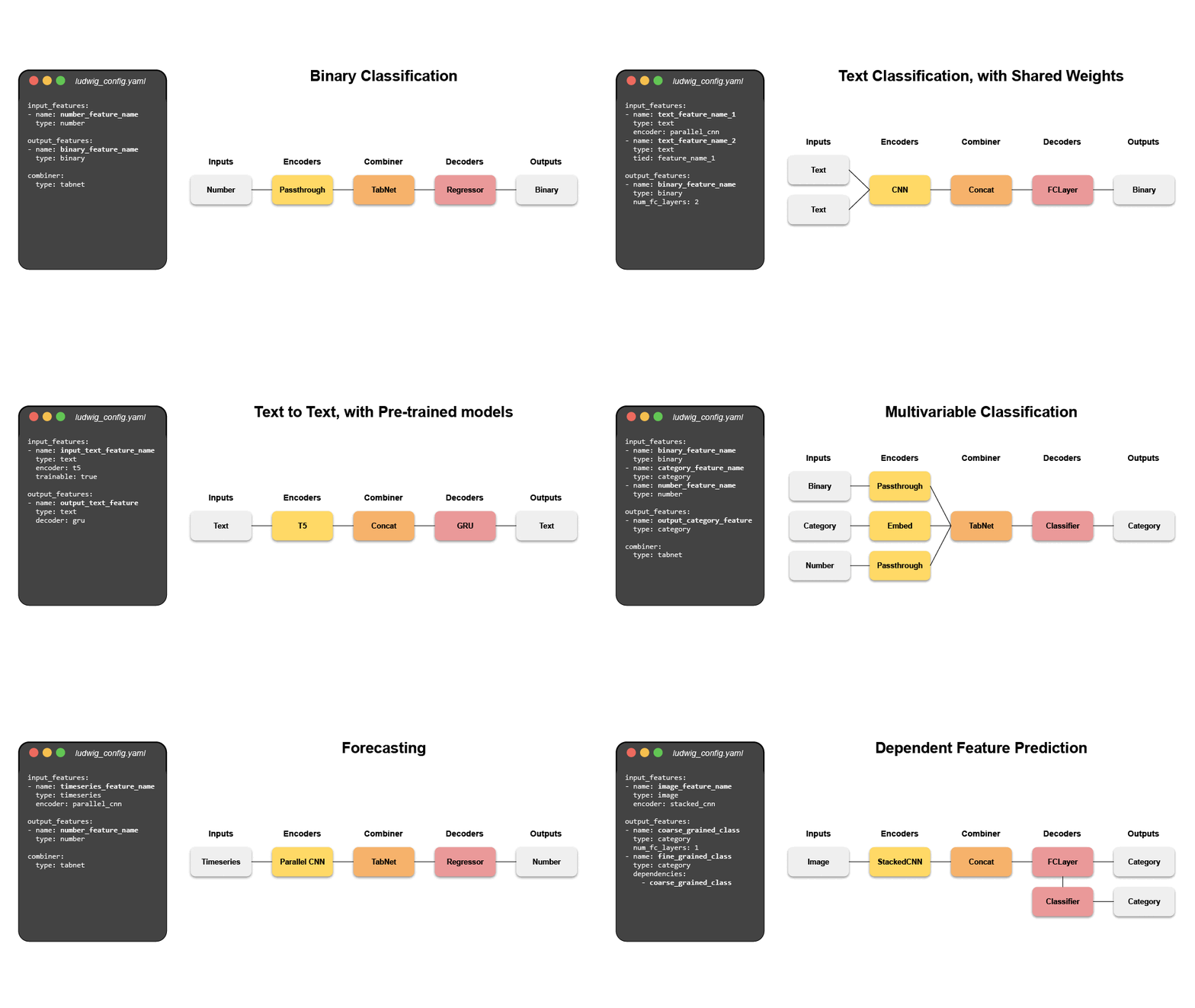
- 🛠 轻松构建自定义模型: 仅需一个声明式的 YAML 配置文件,即可在您的数据上训练最先进的 LLM。支持多任务和多模态学习。全面的配置验证可检测无效的参数组合,防止运行时失败。
- ⚡ 为规模与效率优化: 自动批量大小选择、分布式训练(DDP、DeepSpeed)、参数高效微调(PEFT)、4 位量化(QLoRA)、分页和 8 位优化器,以及大于内存的数据集处理。
- 📐 专家级控制: 保留对模型直至激活函数的完全控制。支持超参数优化、可解释性和丰富的指标可视化。
- 🧱 模块化且可扩展: 只需在配置中更改几个参数,即可尝试不同的模型架构、任务、特征和模态。堪称深度学习的积木。
- 🚢 为生产而设计: 预构建的 Docker 容器、原生支持在 Kubernetes 上通过 Ray 运行、将模型导出为 Torchscript 和 Triton 格式、一键上传到 HuggingFace。
Ludwig 由 Linux Foundation AI & Data 托管。
技术栈: Python 3.12 | PyTorch 2.6 | Pydantic 2 | Transformers 5 | Ray 2.54
💾 安装
从 PyPI 安装。请注意 Ludwig 需要 Python 3.12+。
pip install ludwig
或安装所有可选依赖项:
pip install ludwig[full]
请参阅 贡献指南 获取更详细的安装说明。
🚂 快速开始
想快速了解 Ludwig 的一些功能吗?查看这个 Colab Notebook 🚀 
想要微调 LLMs?查看这些笔记本:
- 微调 Llama-2-7b:
- 微调 Llama-2-13b:
- 微调 Mistral-7b:
大语言模型微调
让我们微调一个预训练的 LLM,使其能像聊天机器人一样遵循指令("指令微调")。
前提条件
- HuggingFace API 令牌
- 对所选基础模型的访问批准(例如,Llama-3.1-8B)
- 至少 12 GiB VRAM 的 GPU(在我们的测试中,使用了 Nvidia T4)
运行
我们将使用 Stanford Alpaca 数据集,其格式将是一个类似表格的文件,如下所示:
| instruction | input | output |
|---|---|---|
| Give three tips for staying healthy. | 1.Eat a balanced diet and make sure to include... | |
| Arrange the items given below in the order to ... | cake, me, eating | I eating cake. |
| Write an introductory paragraph about a famous... | Michelle Obama | Michelle Obama is an inspirational woman who r... |
| ... | ... | ... |
创建一个名为 model.yaml 的 YAML 配置文件,内容如下:
model_type: llm
base_model: meta-llama/Llama-3.1-8B

quantization:
  bits: 4

adapter:
  type: lora

prompt:
  template: |
    Below is an instruction that describes a task, paired with an input that may provide further context.
    Write a response that appropriately completes the request.

    ### Instruction:
    {instruction}

    ### Input:
    {input}

    ### Response:

input_features:
  - name: prompt
    type: text

output_features:
  - name: output
    type: text

trainer:
  type: finetune
  learning_rate: 0.0001
  batch_size: 1
  gradient_accumulation_steps: 16
  epochs: 3
  learning_rate_scheduler:
    decay: cosine
    warmup_fraction: 0.01

preprocessing:
  sample_ratio: 0.1

backend:
  type: local
现在开始训练模型:
export HUGGING_FACE_HUB_TOKEN = "<api_token>"

ludwig train --config model.yaml --dataset "ludwig://alpaca"
监督式机器学习
让我们构建一个神经网络,预测 烂番茄 上某位影评人的评论是正面还是负面。
我们的数据集将是一个如下所示的 CSV 文件:
| movie_title | content_rating | genres | runtime | top_critic | review_content | recommended |
|---|---|---|---|---|---|---|
| Deliver Us from Evil | R | Action & Adventure, Horror | 117.0 | TRUE | Director Scott Derrickson and his co-writer, Paul Harris Boardman, deliver a routine procedural with unremarkable frights. | 0 |
| Barbara | PG-13 | Art House & International, Drama | 105.0 | FALSE | Somehow, in this stirring narrative, Barbara manages to keep hold of her principles, and her humanity and courage, and battles to save a dissident teenage girl whose life the Communists are trying to destroy. | 1 |
| Horrible Bosses | R | Comedy | 98.0 | FALSE | These bosses cannot justify either murder or lasting comic memories, fatally compromising a farce that could have been great but ends up merely mediocre. | 0 |
| ... | ... | ... | ... | ... | ... | ... |
从 这里 下载数据集的样本。
wget https://ludwig.ai/latest/data/rotten_tomatoes.csv
接下来创建一个名为 model.yaml 的 YAML 配置文件,内容如下:
input_features:
  - name: genres
    type: set
    preprocessing:
      tokenizer: comma
  - name: content_rating
    type: category
  - name: top_critic
    type: binary
  - name: runtime
    type: number
  - name: review_content
    type: text
    encoder:
      type: embed
output_features:
  - name: recommended
    type: binary
就这样!现在开始训练模型:
ludwig train --config model.yaml --dataset rotten_tomatoes.csv
祝您建模愉快
尝试将 Ludwig 应用到您的数据上。如果您有任何问题,请 通过 Discord 联系我们。
❓ 为什么您应该使用 Ludwig
- 最少的机器学习样板代码
Ludwig 开箱即用地处理了机器学习的工程复杂性,使研究人员能够专注于最高抽象级别的模型构建。数据预处理、超参数优化、设备管理和 torch.nn.Module 模型的分布式训练完全免费提供。
- 轻松构建您的基准测试
创建最先进的基线模型并与新模型进行比较,只需更改一下配置。
- 轻松将新架构应用于多个问题和数据集
将新模型应用于 Ludwig 支持的广泛任务和数据集。Ludwig 包含一个 完整的基准测试工具包,任何用户都可以使用,只需一个简单的配置即可跨多个数据集运行多个模型的实验。
- 高度可配置的数据预处理、建模和指标
模型架构、训练循环、超参数搜索和后端基础设施的任何方面都可以通过声明式配置中的附加字段进行修改,以定制管道满足您的要求。有关可配置内容的详细信息,请查看 Ludwig 配置 文档。
- 开箱即用的多模态、多任务学习
无需编写代码,即可将表格数据、文本、图像甚至音频混合搭配到复杂的模型配置中。
- 丰富的模型导出和跟踪
使用 Tensorboard、Comet ML、Weights & Biases、MLFlow 和 Aim Stack 等工具自动跟踪所有试验和指标。
- 自动将训练扩展到多 GPU、多节点集群
无需更改代码,即可从本地机器训练扩展到云端。
- 用于最先进模型的低代码接口,包括预训练的 Huggingface Transformers
Ludwig 还原生集成了预训练模型,例如 Huggingface Transformers 中可用的模型。用户可以从大量最先进的预训练 PyTorch 模型中选择使用,无需编写任何代码。例如,使用 Ludwig 训练基于 BERT 的情感分析模型非常简单:
shell
  ludwig train --dataset sst5 --config_str "{input_features: [{name: sentence, type: text, encoder: bert}], output_features: [{name: label, type: category}]}"
- 用于 AutoML 的低代码接口
Ludwig AutoML 允许用户仅提供数据集、目标列和时间预算即可获得训练好的模型。
python
  auto_train_results = ludwig.automl.auto_train(dataset=my_dataset_df, target=target_column_name, time_limit_s=7200)
- 易于生产化
Ludwig 可以轻松部署深度学习模型,包括在 GPU 上。为训练好的 Ludwig 模型启动 REST API。
shell
  ludwig serve --model_path=/path/to/model
Ludwig 支持将模型导出为高效的 Torchscript 包。
shell
  ludwig export_torchscript -–model_path=/path/to/model
📚 教程
🔬 示例用例
- 命名实体识别标注
- 自然语言理解
- 机器翻译
- 通过 seq2seq 进行闲聊对话建模
- 情感分析
- 使用 Siamese 网络进行单样本学习
- 视觉问答
- 口语数字语音识别
- 说话人验证
- 二分类(泰坦尼克号)
- 时间序列预测
- 时间序列预测(天气)
- 电影评分预测
- 多标签分类
- 多任务学习
- 简单回归:燃油效率预测
- 欺诈检测
💡 更多信息
阅读我们关于 Ludwig、声明式 ML 和 Ludwig 的 SoTA 基准测试 的出版物。
了解更多关于 Ludwig 的工作原理、如何入门 并完成更多 示例。
如果您有兴趣 贡献、有问题、评论或想法要分享,或者只是想了解最新动态,请考虑 加入我们的社区 Discord 并在 X 上关注我们!
🤝 加入社区,与我们一同构建 Ludwig
Ludwig 是一个积极维护的开源项目,依赖于像您一样的人的贡献。考虑加入活跃的 Ludwig 贡献者群体,让 Ludwig 成为一个对所有人都更易用、功能更丰富的框架!