OA0 ›
代码 ›
Dstack — 为 AI 训练与推理任务提供轻量云原生编排能力
Dstack — 为 AI 训练与推理任务提供轻量云原生编排能力
curiosity · 2026-02-21 05:20:14 · 148 次点击 · 0 条评论
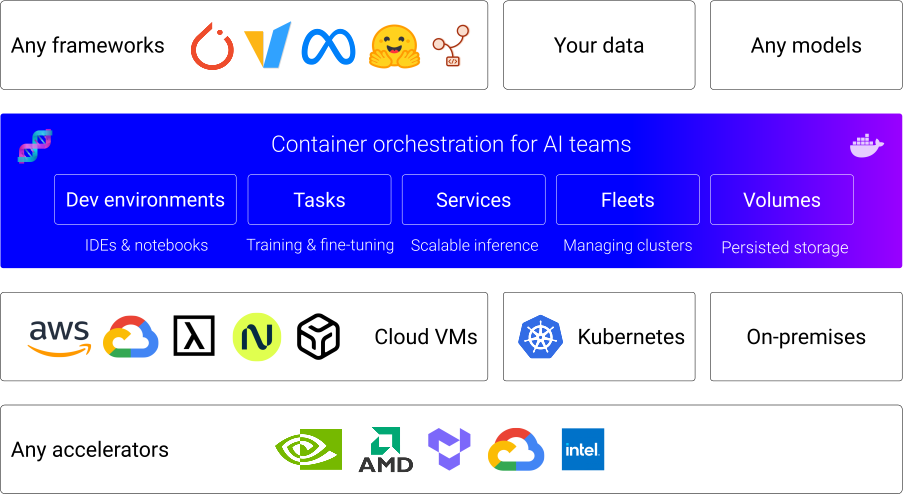
dstack 是一个统一的 GPU 资源供应与编排控制平面,可与任何 GPU 云、Kubernetes 或本地集群协同工作。
它简化了开发、训练和推理流程,并兼容任何硬件、开源工具和框架。
支持的加速器
dstack 开箱即用支持 NVIDIA、AMD、Google TPU、Intel Gaudi 和 Tenstorrent 加速器。
最新动态 ✨
- [2025/12] dstack 0.20.0: 以 Fleet 为核心的用户体验、事件功能等
- [2025/11] dstack 0.19.38: 路由器、SGLang 模型网关集成
- [2025/10] dstack 0.19.31: Kubernetes、GCP A4 抢占式实例
- [2025/08] dstack 0.19.26: 代码仓库
- [2025/08] dstack 0.19.22: 服务探针、GPU 健康检查、Tenstorrent Galaxy
- [2025/07] dstack 0.19.21: 定时任务
- [2025/07] dstack 0.19.17: 密钥、文件、滚动部署
工作原理
安装
在使用
dstackCLI 或 API 之前,需要先设置dstack服务器。如果你已经有一个正在运行的dstack服务器,则只需设置 CLI。
设置服务器
配置后端
为了跨 GPU 云或 Kubernetes 集群编排计算资源,你需要配置后端。
后端可以在 ~/.dstack/server/config.yml 中设置,或通过 UI 中的项目设置页面进行配置。
更多详情,请参阅后端。
当
dstack与本地服务器一起使用时,无需配置后端。服务器启动后,只需创建 SSH 集群即可。
启动服务器
你可以在 Linux、macOS 和 Windows(通过 WSL 2)上安装服务器。它需要 Git 和 OpenSSH。
uv
$ uv tool install "dstack[all]" -U
pip
$ pip install "dstack[all]" -U
安装完成后,即可启动服务器。
$ dstack server
Applying ~/.dstack/server/config.yml...

The admin token is "bbae0f28-d3dd-4820-bf61-8f4bb40815da"
The server is running at http://127.0.0.1:3000/
有关服务器配置选项的更多详细信息,请参阅服务器部署指南。
设置 CLI
#### 设置 CLI 服务器启动后,你可以通过 `dstack` CLI 访问它。 CLI 可以安装在 Linux、macOS 和 Windows 上。它需要 Git 和 OpenSSH。 ##### uv$ uv tool install dstack -U
$ pip install dstack -U
$ dstack project add \
    --name main \
    --url http://127.0.0.1:3000 \
    --token bbae0f28-d3dd-4820-bf61-8f4bb40815da

Configuration is updated at ~/.dstack/config.yml
定义配置
dstack 支持以下配置:
- 集群 — 用于管理云和本地集群
- 开发环境 — 用于使用桌面 IDE 进行交互式开发
- 任务 — 用于调度作业(包括分布式作业)或运行 Web 应用
- 服务 — 用于部署模型和 Web 应用(支持自动扩缩容和授权)
- 卷 — 用于管理持久化卷
配置可以在你的代码仓库中定义为 YAML 文件。
应用配置
通过 dstack apply CLI 命令或编程 API 应用配置。
dstack 会自动管理跨云和本地集群的资源供应、作业排队、自动扩缩容、网络、卷、运行失败、容量不足错误、端口转发等。
有用链接
更多信息,请查看以下链接:
贡献
我们非常欢迎你为 dstack 做出贡献。
有关如何为项目做出贡献的更多信息,请参阅 CONTRIBUTING.md。