OA0 ›
代码 ›
GPT Academic — 集成论文阅读、翻译与代码辅助的学术 AI 工具箱
GPT Academic — 集成论文阅读、翻译与代码辅助的学术 AI 工具箱
unity · 2026-04-02 11:00:21 · 166 次点击 · 0 条评论[!IMPORTANT]
master主分支最新动态(2026.1.25): 新GUI前端测试中,即将发布
master主分支最新动态(2025.8.23): Dockerfile构建效率大幅优化
2025.2.2: 三分钟快速接入最强qwen2.5-max视频
2025.2.1: 支持自定义字体
2024.10.10: 突发停电,紧急恢复了提供whl包的文件服务器
2024.5.1: 加入Doc2x翻译PDF论文的功能,查看详情
2024.3.11: 全力支持Qwen、GLM、DeepseekCoder等中文大语言模型! SoVits语音克隆模块,查看详情
2024.1.17: 安装依赖时,请选择requirements.txt中指定的版本。 安装命令:pip install -r requirements.txt。
 GPT 学术优化 (GPT Academic)
[![Github][Github-image]][Github-url]
[![License][License-image]][License-url]
[![Releases][Releases-image]][Releases-url]
[![Installation][Installation-image]][Installation-url]
[![Wiki][Wiki-image]][Wiki-url]
[![PR][PRs-image]][PRs-url]
[Github-image]: https://img.shields.io/badge/github-12100E.svg?style=flat-square
[License-image]: https://img.shields.io/github/license/binary-husky/gpt_academic?label=License&style=flat-square&color=orange
[Releases-image]: https://img.shields.io/github/release/binary-husky/gpt_academic?label=Release&style=flat-square&color=blue
[Installation-image]: https://img.shields.io/badge/dynamic/json?color=blue&url=https://raw.githubusercontent.com/binary-husky/gpt_academic/master/version&query=$.version&label=Installation&style=flat-square
[Wiki-image]: https://img.shields.io/badge/wiki-项目文档-black?style=flat-square
[PRs-image]: https://img.shields.io/badge/PRs-welcome-pink?style=flat-square
[Github-url]: https://github.com/binary-husky/gpt_academic
[License-url]: https://github.com/binary-husky/gpt_academic/blob/master/LICENSE
[Releases-url]: https://github.com/binary-husky/gpt_academic/releases
[Installation-url]: https://github.com/binary-husky/gpt_academic#installation
[Wiki-url]: https://github.com/binary-husky/gpt_academic/wiki
[PRs-url]: https://github.com/binary-husky/gpt_academic/pulls
如果喜欢这个项目,请给它一个Star;如果您发明了好用的快捷键或插件,欢迎发pull requests!
If you like this project, please give it a Star.
Read this in English | 日本語 | 한국어 | Русский | Français. All translations have been provided by the project itself. To translate this project to arbitrary language with GPT, read and run multi_language.py (experimental).
[!NOTE]
1. 本项目中每个文件的功能都在自译解报告self_analysis.md详细说明。随着版本的迭代,您也可以随时自行点击相关函数插件,调用GPT重新生成项目的自我解析报告。常见问题请查阅wiki。


- 本项目兼容并鼓励尝试国内中文大语言基座模型如通义千问,智谱GLM等。支持多个api-key共存,可在配置文件中填写如
API_KEY="openai-key1,openai-key2,azure-key3,api2d-key4"。需要临时更换API_KEY时,在输入区输入临时的API_KEY然后回车键提交即可生效。

功能(⭐= 近期新增功能) | 描述
--- | ---
⭐[接入新模型](https://github.com/binary-husky/gpt_academic/wiki/%E5%A6%82%E4%BD%95%E5%88%87%E6%8D%A2%E6%A8%A1%E5%9E%8B) | 百度[千帆](https://cloud.baidu.com/doc/WENXINWORKSHOP/s/Nlks5zkzu)与文心一言, 通义千问[Qwen](https://modelscope.cn/models/qwen/Qwen-7B-Chat/summary),上海AI-Lab[书生](https://github.com/InternLM/InternLM),讯飞[星火](https://xinghuo.xfyun.cn/),[LLaMa2](https://huggingface.co/meta-llama/Llama-2-7b-chat-hf),[智谱GLM4](https://open.bigmodel.cn/),DALLE3, [DeepseekCoder](https://coder.deepseek.com/)
⭐支持mermaid图像渲染 | 支持让GPT生成[流程图](https://www.bilibili.com/video/BV18c41147H9/)、状态转移图、甘特图、饼状图、GitGraph等等(3.7版本)
⭐Arxiv论文精细翻译 ([Docker](https://github.com/binary-husky/gpt_academic/pkgs/container/gpt_academic_with_latex)) | [插件] 一键[以超高质量翻译arxiv论文](https://www.bilibili.com/video/BV1dz4y1v77A/),目前最好的论文翻译工具
⭐[实时语音对话输入](https://github.com/binary-husky/gpt_academic/blob/master/docs/use_audio.md) | [插件] 异步[监听音频](https://www.bilibili.com/video/BV1AV4y187Uy/),自动断句,自动寻找回答时机
⭐虚空终端插件 | [插件] 能够使用自然语言直接调度本项目其他插件
润色、翻译、代码解释 | 一键润色、翻译、查找论文语法错误、解释代码
[自定义快捷键](https://www.bilibili.com/video/BV14s4y1E7jN) | 支持自定义快捷键
模块化设计 | 支持自定义强大的[插件](https://github.com/binary-husky/gpt_academic/tree/master/crazy_functions),插件支持[热更新](https://github.com/binary-husky/gpt_academic/wiki/%E5%87%BD%E6%95%B0%E6%8F%92%E4%BB%B6%E6%8C%87%E5%8D%97)
[程序剖析](https://www.bilibili.com/video/BV1cj411A7VW) | [插件] 一键剖析Python/C/C++/Java/Lua/...项目树 或 [自我剖析](https://www.bilibili.com/video/BV1cj411A7VW)
读论文、[翻译](https://www.bilibili.com/video/BV1KT411x7Wn)论文 | [插件] 一键解读latex/pdf论文全文并生成摘要
Latex全文[翻译](https://www.bilibili.com/video/BV1nk4y1Y7Js/)、[润色](https://www.bilibili.com/video/BV1FT411H7c5/) | [插件] 一键翻译或润色latex论文
批量注释生成 | [插件] 一键批量生成函数注释
Markdown[中英互译](https://www.bilibili.com/video/BV1yo4y157jV/) | [插件] 看到上面5种语言的[README](https://github.com/binary-husky/gpt_academic/blob/master/docs/README.English.md)了吗?就是出自他的手笔
[PDF论文全文翻译功能](https://www.bilibili.com/video/BV1KT411x7Wn) | [插件] PDF论文提取题目&摘要+翻译全文(多线程)
[Arxiv小助手](https://www.bilibili.com/video/BV1LM4y1279X) | [插件] 输入arxiv文章url即可一键翻译摘要+下载PDF
Latex论文一键校对 | [插件] 仿Grammarly对Latex文章进行语法、拼写纠错+输出对照PDF
[谷歌学术统合小助手](https://www.bilibili.com/video/BV19L411U7ia) | [插件] 给定任意谷歌学术搜索页面URL,让gpt帮你[写relatedworks](https://www.bilibili.com/video/BV1GP411U7Az/)
互联网信息聚合+GPT | [插件] 一键[让GPT从互联网获取信息](https://www.bilibili.com/video/BV1om4y127ck)回答问题,让信息永不过时
公式/图片/表格显示 | 可以同时显示公式的[tex形式和渲染形式](https://user-images.githubusercontent.com/96192199/230598842-1d7fcddd-815d-40ee-af60-baf488a199df.png),支持公式、代码高亮
启动暗色[主题](https://github.com/binary-husky/gpt_academic/issues/173) | 在浏览器url后面添加```/?__theme=dark```可以切换dark主题
[多LLM模型](https://www.bilibili.com/video/BV1wT411p7yf)支持 | 同时被GPT3.5、GPT4、[清华ChatGLM2](https://github.com/THUDM/ChatGLM2-6B)、[复旦MOSS](https://github.com/OpenLMLab/MOSS)伺候的感觉一定会很不错吧?
更多LLM模型接入,支持[huggingface部署](https://huggingface.co/spaces/qingxu98/gpt-academic) | 加入Newbing接口(新必应),引入清华[Jittorllms](https://github.com/Jittor/JittorLLMs)支持[LLaMA](https://github.com/facebookresearch/llama)和[盘古α](https://openi.org.cn/pangu/)
⭐[void-terminal](https://github.com/binary-husky/void-terminal) pip包 | 脱离GUI,在Python中直接调用本项目的所有函数插件(开发中)
更多新功能展示 (图像生成等) …… | 见本文档结尾处 ……
- 新界面(修改
config.py中的LAYOUT选项即可实现“左右布局”和“上下布局”的切换)


- 所有按钮都通过读取functional.py动态生成,可随意加自定义功能,解放剪贴板
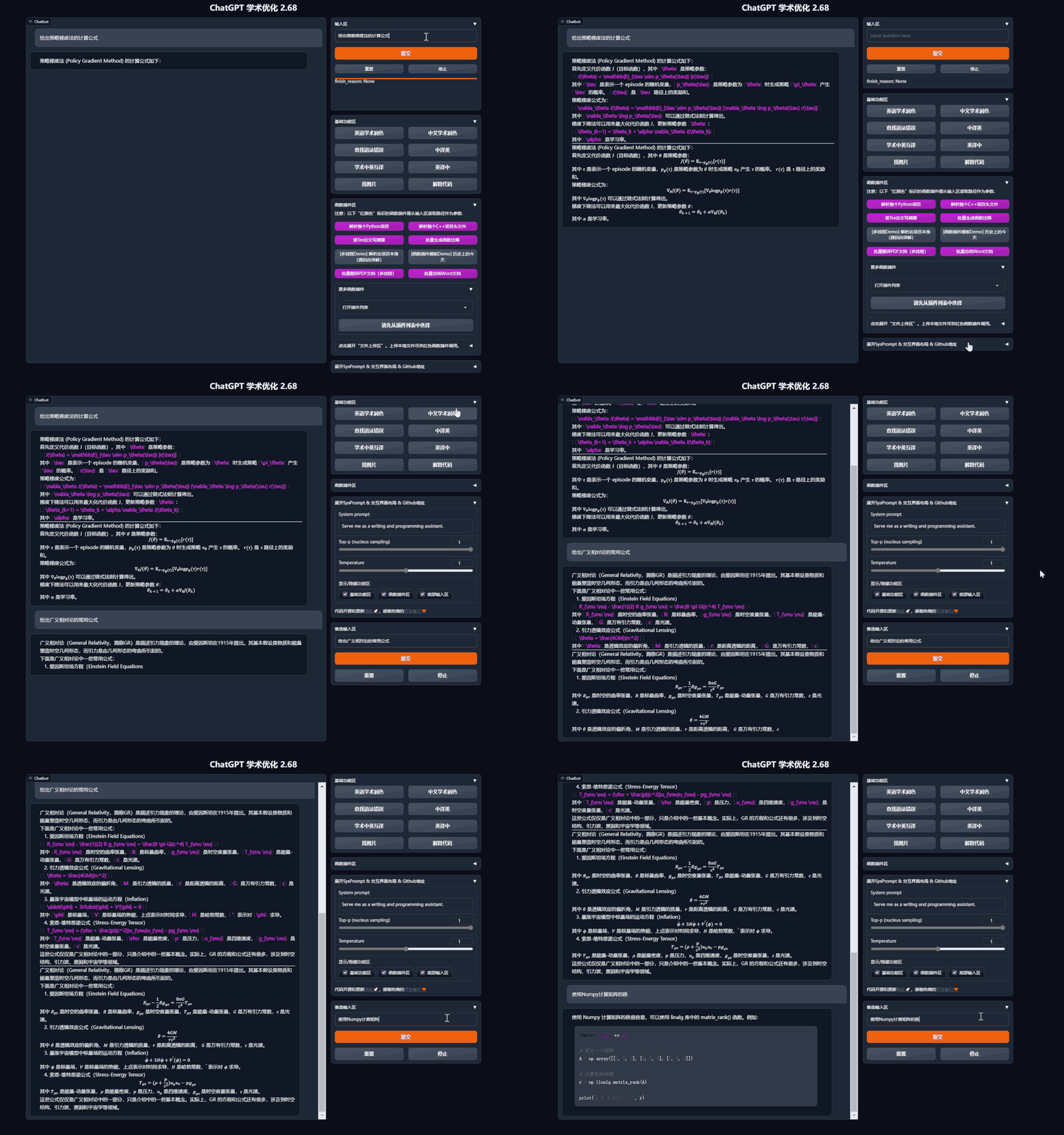
- 润色/纠错
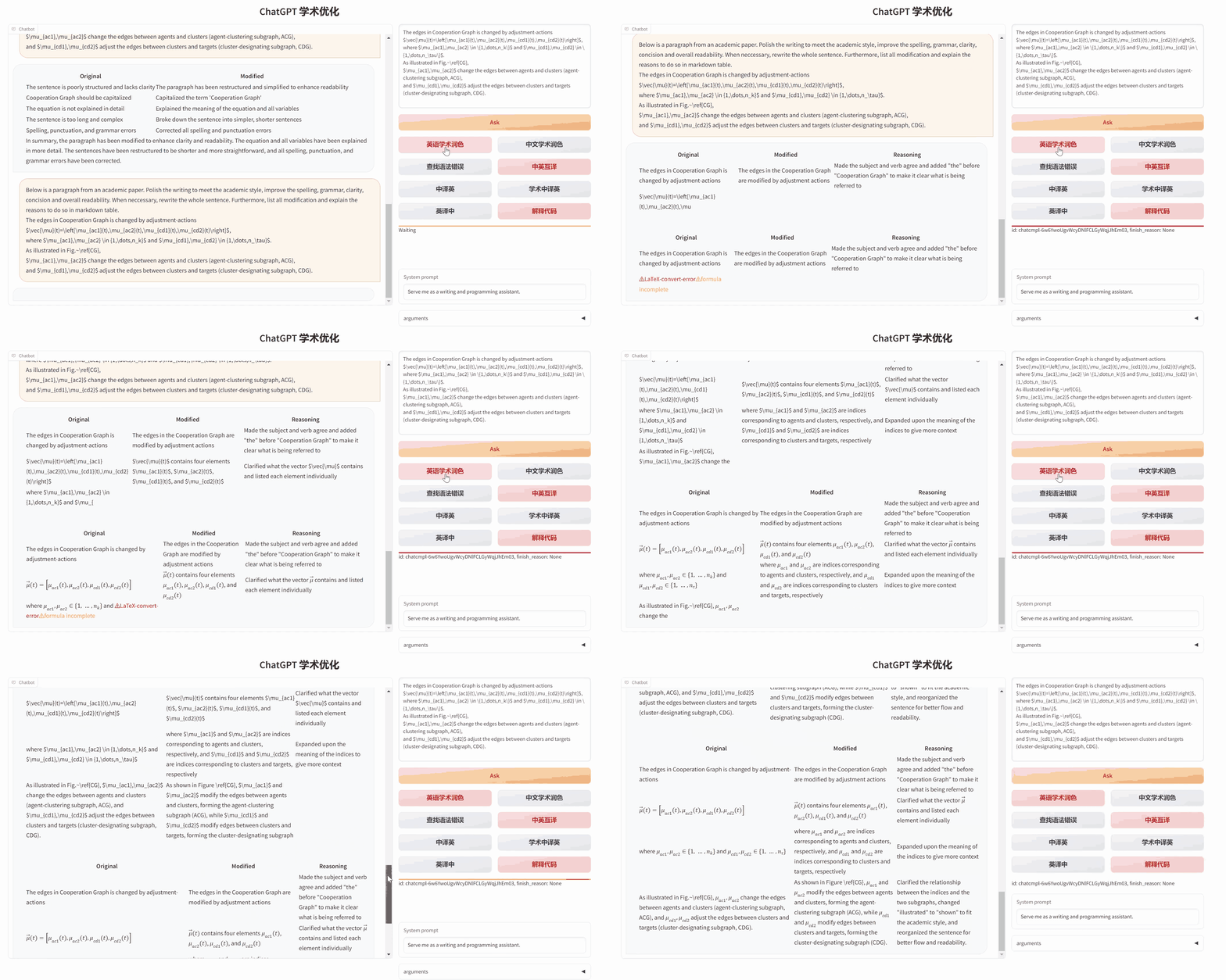
- 如果输出包含公式,会以tex形式和渲染形式同时显示,方便复制和阅读
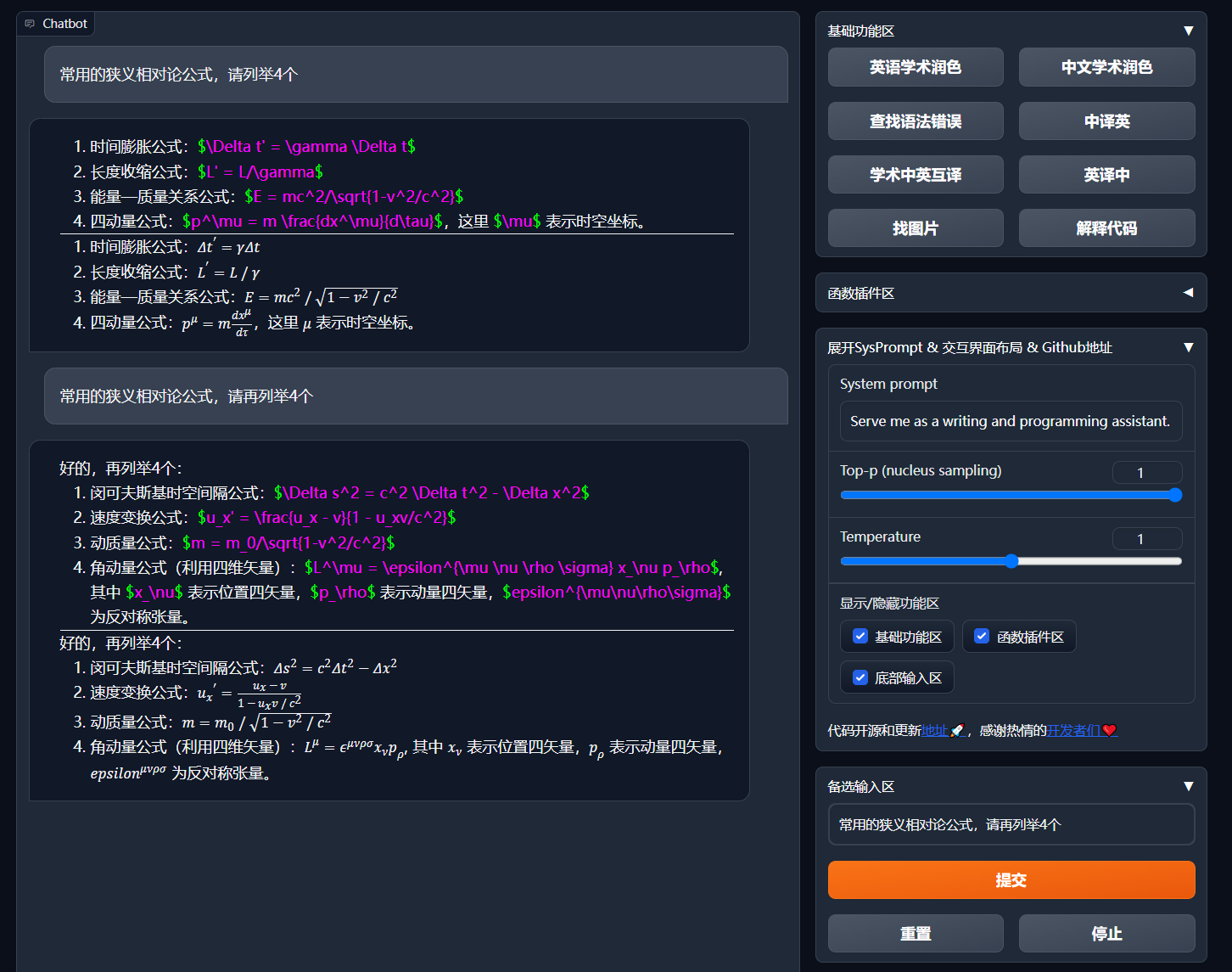
- 懒得看项目代码?直接把整个工程炫ChatGPT嘴里
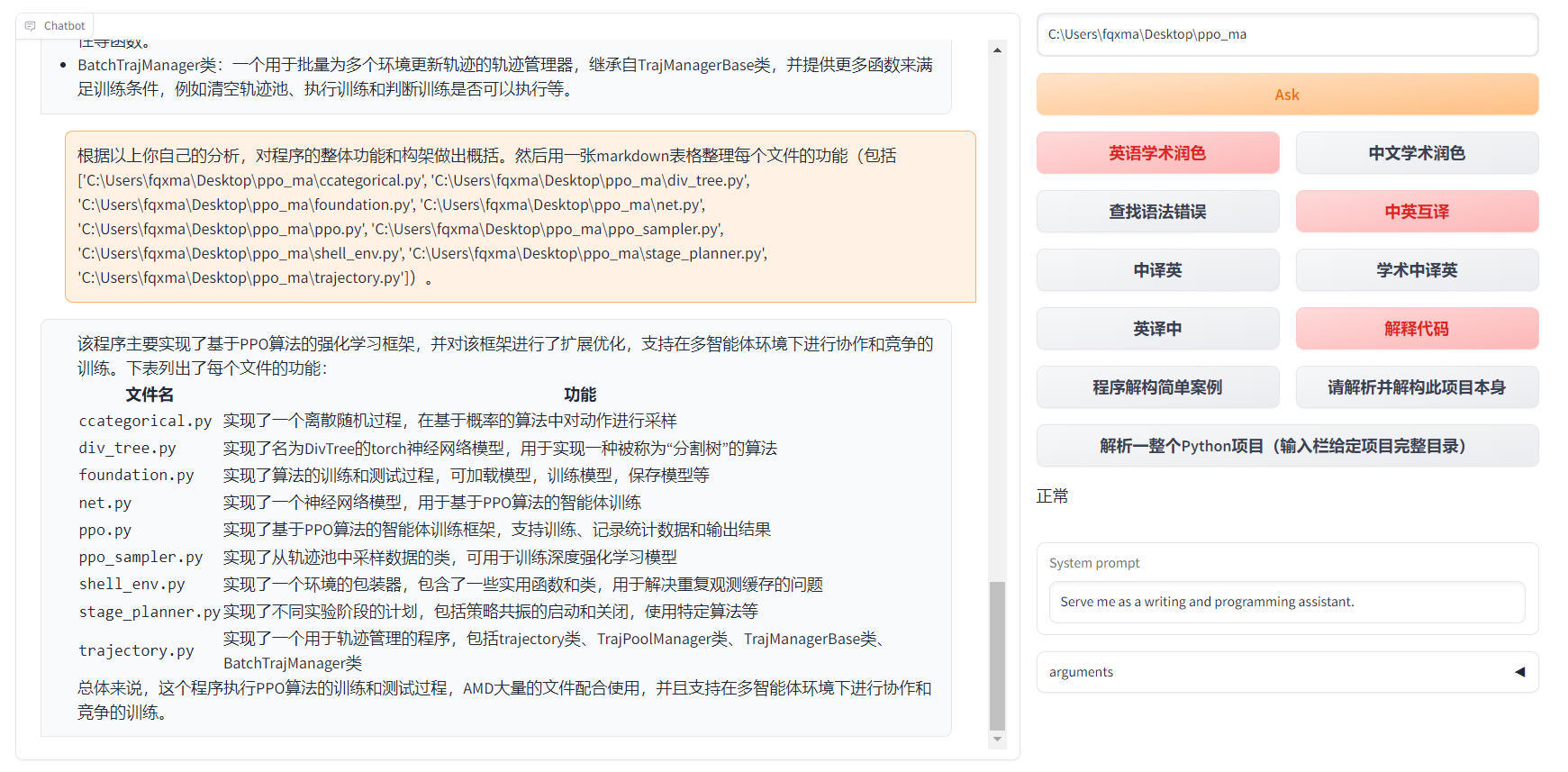
- 多种大语言模型混合调用(ChatGLM + OpenAI-GPT3.5 + GPT4)
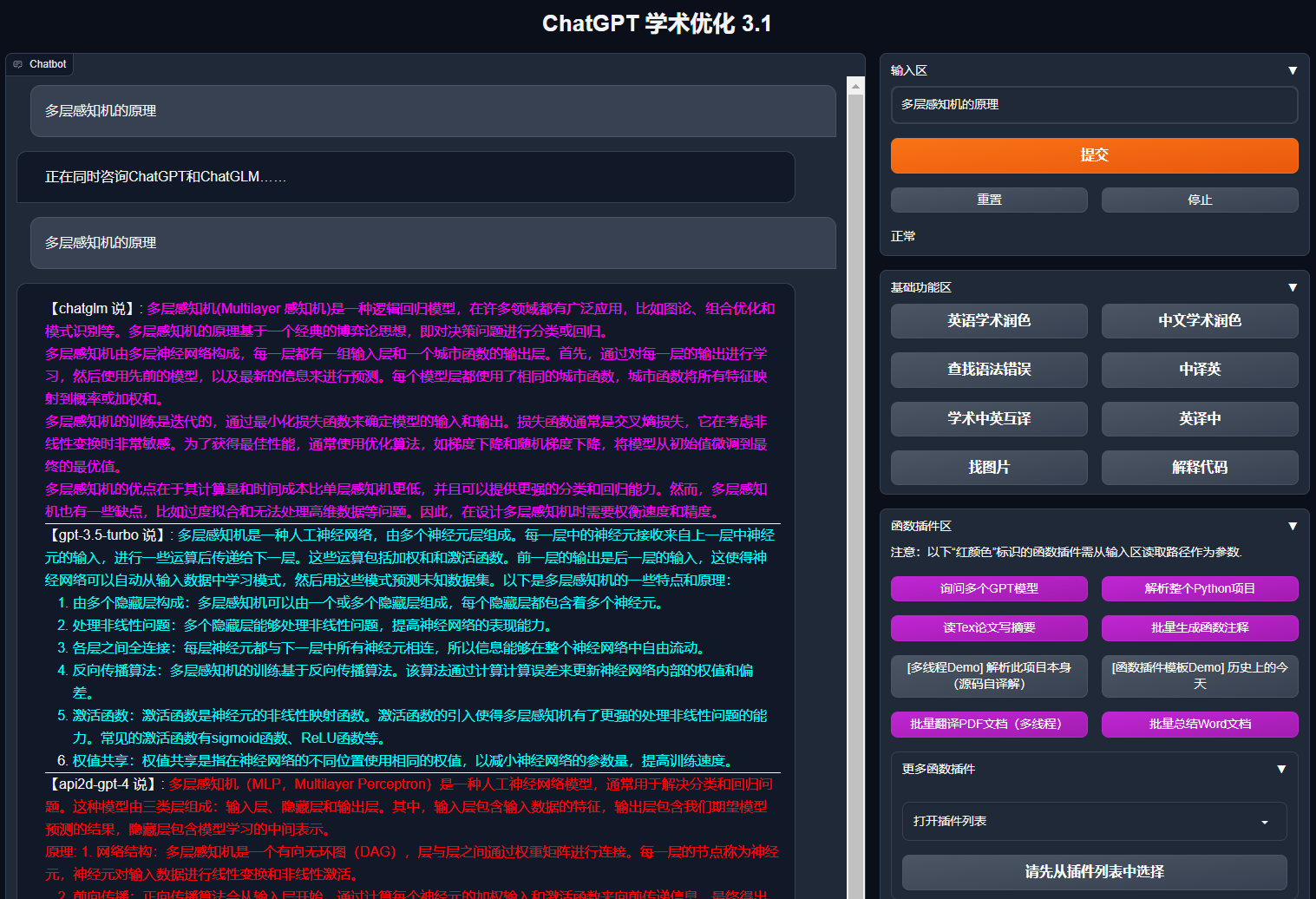
安装
flowchart TD
    A{"安装方法"} --> W1("I 🔑直接运行 (Windows, Linux or MacOS)")
    W1 --> W11["1 Python pip包管理依赖"]
    W1 --> W12["2 Anaconda包管理依赖(推荐⭐)"]

    A --> W2("II 🐳使用Docker (Windows, Linux or MacOS)")

    W2 --> k1["1 部署项目全部能力的大镜像(推荐⭐)"]
    W2 --> k2["2 仅在线模型(GPT, GLM4等)镜像"]
    W2 --> k3["3 在线模型 + Latex的大镜像"]

    A --> W4("IV 🚀其他部署方法")
    W4 --> C1["1 Windows/MacOS 一键安装运行脚本(推荐⭐)"]
    W4 --> C2["2 Huggingface, Sealos远程部署"]
    W4 --> C4["3 其他 ..."]
安装方法I:直接运行 (Windows, Linux or MacOS)
-
下载项目
sh git clone --depth=1 https://github.com/binary-husky/gpt_academic.git cd gpt_academic -
配置API_KEY等变量
在
config.py中,配置API KEY等变量。特殊网络环境设置方法、Wiki-项目配置说明。「 程序会优先检查是否存在名为
config_private.py的私密配置文件,并用其中的配置覆盖config.py的同名配置。如您能理解以上读取逻辑,我们强烈建议您在config.py同路径下创建一个名为config_private.py的新配置文件,并使用config_private.py配置项目,从而确保自动更新时不会丢失配置 」。「 支持通过
环境变量配置项目,环境变量的书写格式参考docker-compose.yml文件或者我们的Wiki页面。配置读取优先级:环境变量>config_private.py>config.py」。 -
安装依赖
```sh
# (选择I: 如熟悉python, python推荐版本 3.9 ~ 3.11)备注:使用官方pip源或者阿里pip源, 临时换源方法:python -m pip install -r requirements.txt -i https://mirrors.aliyun.com/pypi/simple/
python -m pip install -r requirements.txt(选择II: 使用Anaconda)步骤也是类似的 (https://www.bilibili.com/video/BV1rc411W7Dr):
conda create -n gptac_venv python=3.11 # 创建anaconda环境
conda activate gptac_venv # 激活anaconda环境
python -m pip install -r requirements.txt # 这个步骤和pip安装一样的步骤(选择III: 使用uv):
uv venv --python=3.11 # 创建虚拟环境
source ./.venv/bin/activate # 激活虚拟环境
uv pip install --verbose -r requirements.txt -i https://mirrors.aliyun.com/pypi/simple/ # 安装依赖
```
如果需要支持清华ChatGLM系列/复旦MOSS/RWKV作为后端,请点击展开此处
【可选步骤】如果需要支持清华ChatGLM系列/复旦MOSS作为后端,需要额外安装更多依赖(前提条件:熟悉Python + 用过Pytorch + 电脑配置够强): ```sh # 【可选步骤I】支持清华ChatGLM3。清华ChatGLM备注:如果遇到"Call ChatGLM fail 不能正常加载ChatGLM的参数" 错误,