OA0 ›
代码 ›
Parlant — 面向客服与业务流程的 Agent 框架
Parlant — 面向客服与业务流程的 Agent 框架
although · 2026-04-28 11:00:17 · 164 次点击 · 0 条评论
终终终于,LLM 代理可以真正遵循指令了
🌐 网站 • ⚡ 快速开始 • 💬 Discord • 📖 示例
Deutsch | Español | français | 日本語 | 한국어 | Português | Русский | 中文





🎯 每个 AI 开发者都面临的问题
你构建了一个 AI 代理。测试中它表现完美。然后真实用户开始和它对话,结果……
- ❌ 它忽略了你精心编写的系统提示
- ❌ 它在关键时刻产生幻觉回答
- ❌ 它无法一致地处理边缘情况
- ❌ 每次对话都像掷骰子一样充满不确定性
听起来很耳熟? 不只你一个人这样。这是开发生产级 AI 代理的开发者的第一大痛点。
⚡ 解决方案:别再依赖提示词,开始教导行为准则
Parlant 颠覆了 AI 代理的开发方式。与其祈祷你的 LLM 遵循指令,Parlant 确保它遵从指令。
# 传统方式:全靠运气 🤞
system_prompt = "You are a helpful assistant. Please follow these 47 rules..."

# Parlant 方式:确保合规 ✅
await agent.create_guideline(
    condition="Customer asks about refunds",
    action="Check order status first to see if eligible",
    tools=[check_order_status],
)
Parlant 提供了构建客户交互代理所需的所有结构,使其行为完全符合你的业务要求:
- 用户旅程 (Journeys):定义清晰的客户旅程以及代理在每个阶段应如何回应。
- 行为准则 (Behavioral Guidelines):轻松制定代理行为;Parlant 会根据上下文匹配相关元素。
- 工具使用 (Tool Use):将外部 API、数据获取器或后端服务关联到特定的交互事件。
- 领域适配 (Domain Adaptation):教代理识别领域特定术语,并生成个性化回复。
- 预设回复 (Canned Responses):使用回复模板消除幻觉,保证风格一致性。
- 可解释性 (Explainability):理解每条准则何时被匹配和遵循。
工作原理
当你的代理收到消息后,Parlant 引擎会在生成回复前准备一个完全对齐的回复:
%%{init: {'theme': 'base', 'themeVariables': {'primaryColor': '#e8f5e9', 'primaryTextColor': '#1b5e20', 'primaryBorderColor': '#81c784', 'lineColor': '#66bb6a', 'secondaryColor': '#fff9e1', 'tertiaryColor': '#F3F5F6'}}}%%
flowchart LR
    A(User):::outputNode

    subgraph Engine["Parlant Engine"]
        direction LR
        B["匹配准则并解析旅程状态"]:::matchNode
        C["调用上下文相关的工具"]:::toolNode
        D["生成消息"]:::composeNode
        E["预设消息"]:::cannedNode
    end

    A a@-->|💬 用户输入| B
    B b@--> C
    C c@-->|流体输出模式?| D
    C d@-->|严格输出模式?| E
    D e@-->|💬 流体输出| A
    E f@-->|💬 预设输出| A

    a@{animate: true}
    b@{animate: true}
    c@{animate: true}
    d@{animate: true}
    e@{animate: true}
    f@{animate: true}

    linkStyle 2 stroke-width:2px
    linkStyle 4 stroke-width:2px
    linkStyle 3 stroke-width:2px,stroke:#3949AB
    linkStyle 5 stroke-width:2px,stroke:#3949AB

    classDef composeNode fill:#F9E9CB,stroke:#AB8139,stroke-width:2px,color:#7E5E1A,stroke-width:0
    classDef cannedNode fill:#DFE3F9,stroke:#3949AB,stroke-width:2px,color:#1a237e,stroke-width:0
与当前对话状态相关的准则和工具会被仔细匹配并强制执行,使你的代理即使在复杂的行为配置下也能保持专注和一致。
## 🚀 60 秒内让你的代理运行起来
pip install parlant
import parlant.sdk as p

@p.tool
async def get_weather(context: p.ToolContext, city: str) -> p.ToolResult:
    # 你的天气 API 逻辑
    return p.ToolResult(f"Sunny, 72°F in {city}")

@p.tool
async def get_datetime(context: p.ToolContext) -> p.ToolResult:
    from datetime import datetime
    return p.ToolResult(datetime.now())

async def main():
    async with p.Server() as server:
        agent = await server.create_agent(
            name="WeatherBot",
            description="Helpful weather assistant"
        )

        # 使用上下文变量,让代理的上下文在每次响应时更新(更新间隔可自定义)
        await agent.create_variable(name="current-datetime", tool=get_datetime)

        # 使用自然语言控制和引导代理行为
        await agent.create_guideline(
            condition="User asks about weather",
            action="Get current weather and provide tips and suggestions",
            tools=[get_weather]
        )

        # 添加其他(可靠执行的)行为建模元素
        # ...

        # 🎉 测试游乐场已在 http://localhost:8800 准备就绪
        # 将官方的 React 小组件集成到你的应用中,
        # 或按照教程构建你自己的前端!

if __name__ == "__main__":
    import asyncio
    asyncio.run(main())
就这样! 你的代理已经启动并运行,能够确保遵循规则的行为。
🎬 查看实际效果

🧪 测试你的代理
使用集成的测试与评估框架来验证代理行为。
from parlant.testing import Suite, InteractionBuilder
from parlant.testing.steps import AgentMessage, CustomerMessage

suite = Suite(server_url="http://localhost:8800", agent_id="your_agent")

@suite.scenario
async def test_booking_flow():
    async with suite.session() as session:
        # 构建对话历史
        history = (
            InteractionBuilder()
            .step(CustomerMessage("Man it's cold today"))
            .step(AgentMessage("Tell me about it, I'm freezing my nuts and bolts off."))
            .step(CustomerMessage("Where are you from? I'm from Boston"))
            .step(AgentMessage("What a dream! I'm stuck in a data center in San Fran..."))
            .build()
        )

        # 用事件历史预加载会话
        await session.add_events(history)

        # 发送客户消息
        response = await session.send("What's the temperature there today?")

        # 使用 LLM-as-a-Judge 对代理回复进行断言
        await response.should("provide weather details for San Francisco")
运行命令:parlant-test your_tests.py

🔥 为什么开发者转向 Parlant
| ### 🏗️ **传统 AI 框架** | ### ⚡ **Parlant** |
| - 编写复杂的系统提示 - 希望 LLM 遵循它们 - 调试不可预测的行为 - 通过提示工程扩展 - 祈祷系统的可靠性 | - 用自然语言定义规则 - **确保**规则被遵循 - 可预测、一致的行为 - 通过添加准则扩展 - 从第一天起就达到生产就绪 |
🎯 完美的应用场景
| **金融服务** | **医疗保健** | **电子商务** | **法律科技** |
| :----------------------: | :---------------------: | :-------------------------: | :------------------------: |
| 合规优先设计 | 符合 HIPAA 的代理 | 大规模客户服务 | 精确的法律指导 |
| 内置风险管理 | 患者数据保护 | 订单处理自动化 | 文档审阅协助 |
🛠️ 企业级功能
- 🧭 对话旅程 (Conversational Journeys) - 引导客户逐步达成目标
- 🎯 动态准则匹配 (Dynamic Guideline Matching) - 上下文感知的规则应用
- 🔧 可靠的工具集成 (Reliable Tool Integration) - API、数据库、外部服务
- 📊 对话分析 (Conversation Analytics) - 深入了解代理行为
- 🔄 迭代优化 (Iterative Refinement) - 持续改进代理回复
- 🛡️ 内置护栏 (Built-in Guardrails) - 防止幻觉和离题回复
- 📱 React 小组件 (React Widget) - 可嵌入任何 Web 应用的聊天 UI
- 🔍 完全可解释性 (Full Explainability) - 理解代理的每一个决策
📈 加入 10,000+ 名开发者,共同构建更好的 AI
**使用 Parlant 的公司:**
_金融机构 • 医疗保健提供者 • 法律事务所 • 电子商务平台_
[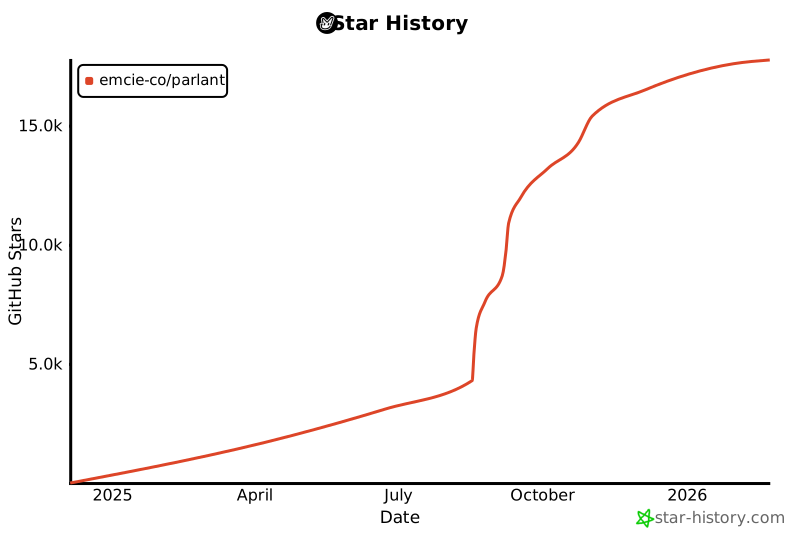](https://star-history.com/#emcie-co/parlant&Date)
🌟 开发者怎么说
"这是迄今为止我遇到过的最优雅的对话式 AI 框架!使用 Parlant 开发是纯粹的乐趣。" — Vishal Ahuja, JPMorgan Chase 客户面对型对话式 AI 高级负责人
🏃♂️ 快速上手路径
| 🎯 我想亲自测试 | → 5 分钟快速入门 |
| 🛠️ 我想看个例子 | → 医疗保健代理示例 |
| 🚀 我想参与其中 | → 加入我们的 Discord 社区 |
🤝 社区与支持
- 💬 Discord 社区 - 从团队和社区获得帮助
- 📖 文档 - 全面的指南和示例
- 🐛 GitHub Issues - 报告错误和提出功能请求
- 📧 直接支持 - 直接联系我们的工程团队
📄 许可证
Apache 2.0 - 可在任何地方使用,包括商业项目。
**准备好构建真正有效的 AI 代理了吗?**
⭐ **给这个仓库点个星** • 🚀 **[立即尝试 Parlant](https://parlant.io/)** • 💬 **[加入 Discord](https://discord.gg/duxWqxKk6J)**
_由 [Emcie](https://emcie.co) 团队用 ❤️ 打造_