OA0 ›
代码 ›
Jina AI CLIP as Service — 轻量级多模态向量编码服务
Jina AI CLIP as Service — 轻量级多模态向量编码服务
webapp · 2026-09-21 11:00:17 · 66 次点击 · 0 条评论




-brightgreen?style=flat-square&logo=googlecolab&&logoColor=white)
CLIP-as-service 是一个低延迟、高可扩展性的服务,用于嵌入图像和文本。它可以轻松作为微服务集成到神经搜索解决方案中。
⚡ 快速:使用 TensorRT、ONNX runtime 和未使用 JIT 的 PyTorch 部署 CLIP 模型,可达 800QPS[*]。请求和响应采用非阻塞双工流式传输,专为大数据和长时间运行的任务设计。
🫐 弹性:在单块 GPU 上水平扩缩多个 CLIP 模型,并自动负载均衡。
🐥 易用:无学习曲线,客户端和服务端设计极简。提供直观且一致的图像和句子嵌入 API。
👒 现代:支持异步客户端。可在 gRPC、HTTP、WebSocket 协议之间轻松切换,并支持 TLS 和压缩。
🍱 集成:可与神经搜索生态无缝集成,包括 Jina 和 DocArray。可快速构建跨模态和多模态解决方案。
[*] 使用默认配置(单副本,PyTorch 未启用 JIT),在 GeForce RTX 3090 上测得。
文本与图像嵌入
| 通过 HTTPS 🔐 | 通过 gRPC 🔐⚡⚡ |
|
|
视觉推理
视觉推理有四种基本技能:物体识别、物体计数、颜色识别和空间关系理解。让我们试几个例子:
你需要安装
jq(一个 JSON 处理器) 来美化结果。
| 图像 | 通过 HTTPS 🔐 |
|
|
|
|
|
|
|
|
|
文档
安装
CLIP-as-service 由两个 Python 包 clip-server 和 clip-client 组成,它们可以_独立_安装。两者都要求 Python 3.7+。
安装服务端
| Pytorch 运行时 ⚡ | ONNX 运行时 ⚡⚡ | TensorRT 运行时 ⚡⚡⚡ |
|
|
|
你也可以在 Google Colab 上托管服务端,利用其免费 GPU/TPU。
安装客户端
pip install clip-client
快速检查
安装后,你可以运行一个简单的连通性检查。
| C/S | 命令 | 预期输出 |
|---|---|---|
| 服务端 |
|

|
| 客户端 |
|

|
你可以将 0.0.0.0 改为内网或公网 IP 地址,以测试私有网络和公网下的连通性。
快速开始
基本用法
- 启动服务端:
python -m clip_server。记住它的地址和端口。 -
创建客户端:
```python
from clip_client import Clientc = Client('grpc://0.0.0.0:51000')
3. 获取句子嵌入:python
r = c.encode(['First do it', 'then do it right', 'then do it better'])print(r.shape) # [3, 512]
4. 获取图像嵌入:python
r = c.encode(['apple.png', # 本地图像
'https://clip-as-service.jina.ai/_static/favicon.png', # 远程图像
'data:image/gif;base64,R0lGODlhEAAQAMQAAORHHOVSKudfOulrSOp3WOyDZu6QdvCchPGolfO0o/XBs/fNwfjZ0frl3/zy7////wAAAAAAAAAAAAAAAAAAAAAAAAAAAAAAAAAAAAAAAAAAAAAAAAAAAAAAAAAAAAAAACH5BAkAABAALAAAAAAQABAAAAVVICSOZGlCQAosJ6mu7fiyZeKqNKToQGDsM8hBADgUXoGAiqhSvp5QAnQKGIgUhwFUYLCVDFCrKUE1lBavAViFIDlTImbKC5Gm2hB0SlBCBMQiB0UjIQA7']) # 图像 URIprint(r.shape) # [3, 512]
```
更全面的服务端和客户端用户指南可查看文档。
10 行代码实现文本到图像的跨模态搜索
让我们使用 CLIP-as-service 构建一个文本到图像搜索。也就是说,用户可以输入一句话,程序返回匹配的图像。我们将使用 Totally Looks Like 数据集和 DocArray 包。注意,DocArray 作为上游依赖已包含在 clip-client 中,因此你不需要单独安装它。
加载图像
首先加载图像。你可以直接从 Jina Cloud 拉取:
from docarray import DocumentArray

da = DocumentArray.pull('ttl-original', show_progress=True, local_cache=True)
或下载 TTL 数据集、解压、手动加载
或者,你可以访问 [Totally Looks Like](https://sites.google.com/view/totally-looks-like-dataset) 官方网站,解压并加载图像:from docarray import DocumentArray
da = DocumentArray.from_files(['left/*.jpg', 'right/*.jpg'])
该数据集包含 12,032 张图像,因此拉取可能需要一些时间。完成后,你可以可视化它,并先感受一下这些图像:
da.plot_image_sprites()

编码图像
使用 python -m clip_server 启动服务端。假设它位于 0.0.0.0:51000,使用 GRPC 协议(运行服务端后你会获得此信息)。
创建一个 Python 客户端脚本:
from clip_client import Client

c = Client(server='grpc://0.0.0.0:51000')

da = c.encode(da, show_progress=True)
根据你的 GPU 和客户端-服务端网络情况,嵌入 12K 张图像可能需要一些时间。在我的情况下,大约用了两分钟。
下载预编码数据集
如果你没耐心,或者没有 GPU,等待可能会很痛苦。在这种情况下,你可以直接拉取我们预编码的图像数据集:from docarray import DocumentArray
da = DocumentArray.pull('ttl-embedding', show_progress=True, local_cache=True)
通过句子搜索
让我们构建一个简单的提示,允许用户输入句子:
while True:
    vec = c.encode([input('sentence> ')])
    r = da.find(query=vec, limit=9)
    r[0].plot_image_sprites()
展示
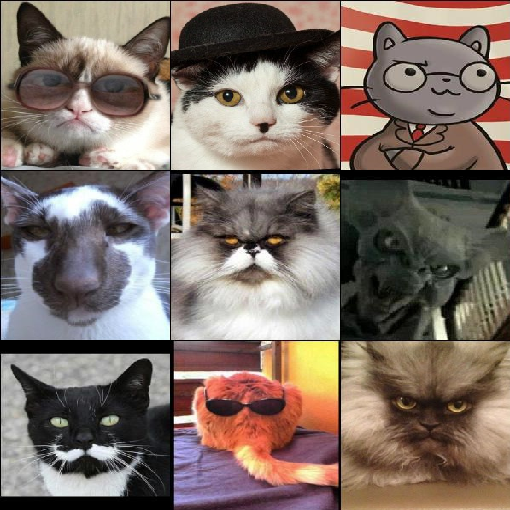
现在你可以输入任意英文句子,并查看最匹配的前 9 张图像。搜索快速且直观。让我们玩一玩:
| "a happy potato" | "a super evil AI" | "a guy enjoying his burger" |
|---|---|---|
|
|
|
|
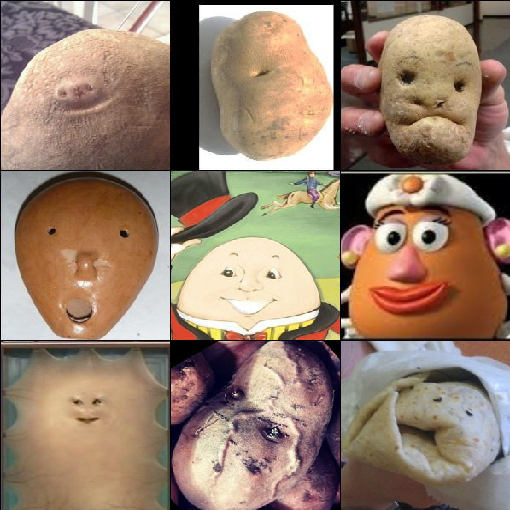
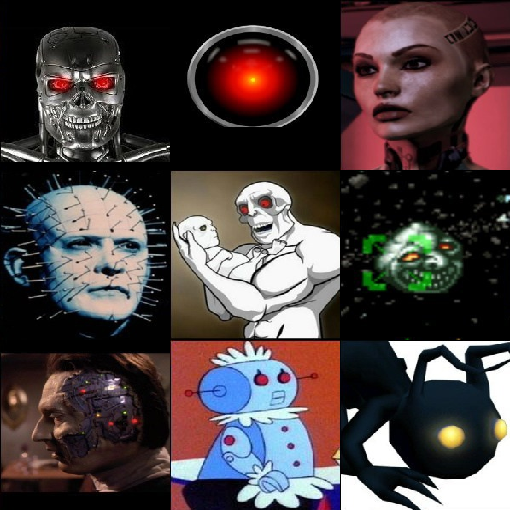
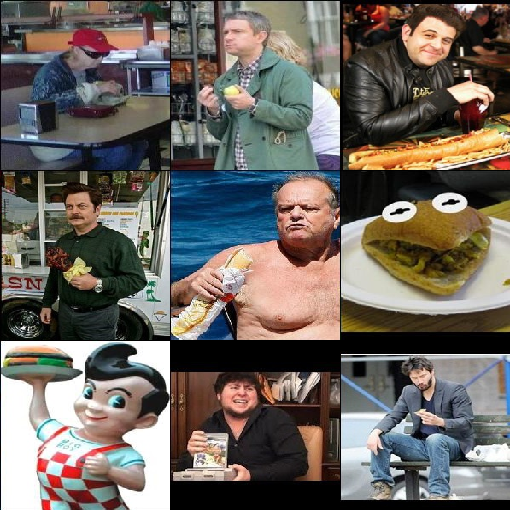
| "professor cat is very serious" | "an ego engineer lives with parent" | "there will be no tomorrow so lets eat unhealthy" |
|---|---|---|
|
|
|
|
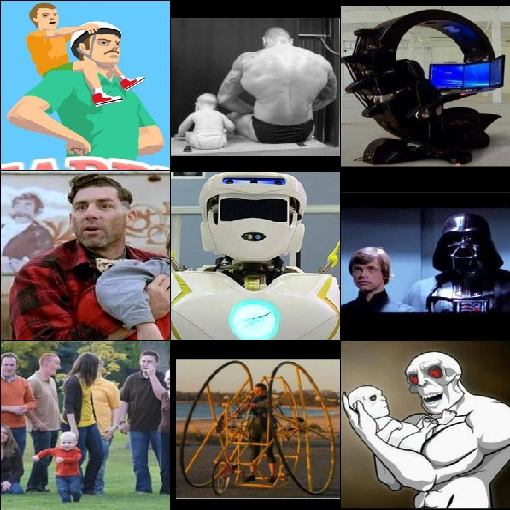
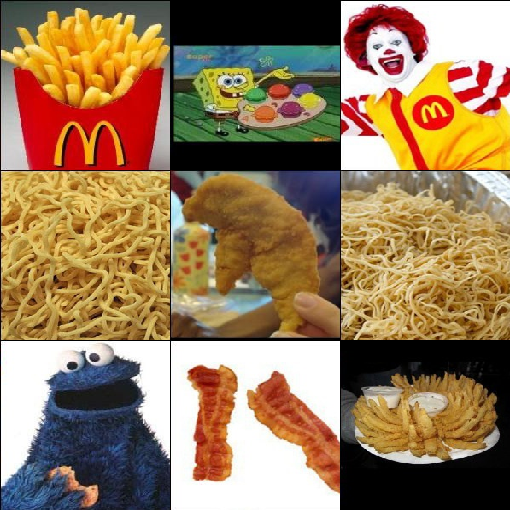
让我们保存嵌入结果,用于下一个示例:
da.save_binary('ttl-image')
10 行代码实现图像到文本的跨模态搜索
我们也可以交换上一个程序的输入和输出,实现图像到文本搜索。准确地说,给定一张查询图像,找到最能描述该图像的句子。
让我们使用《傲慢与偏见》一书中的所有句子。
from docarray import Document, DocumentArray

d = Document(uri='https://www.gutenberg.org/files/1342/1342-0.txt').load_uri_to_text()
da = DocumentArray(
    Document(text=s.strip()) for s in d.text.replace('\r\n', '').split('.') if s.strip()
)
看看我们得到了什么:
da.summary()
            Documents Summary

  Length                 6403
  Homogenous Documents   True
  Common Attributes      ('id', 'text')

                     Attributes Summary

  Attribute   Data type   #Unique values   Has empty value
  ──────────────────────────────────────────────────────────
  id          ('str',)    6403             False
  text        ('str',)    6030             False
编码句子
现在编码这 6,403 个句子,根据你的 GPU 和网络情况,可能需要 10 秒或更少:
from clip_client import Client

c = Client('grpc://0.0.0.0:51000')

r = c.encode(da, show_progress=True)
下载预编码数据集
同样,对于没耐心或没有 GPU 的用户,我们准备了一个预编码的文本数据集:from docarray import DocumentArray
da = DocumentArray.pull('ttl-textual', show_progress=True, local_cache=True)
通过图像搜索
让我们加载之前存储的图像嵌入,随机采样 10 个图像 Document,然后找到每个图像的前 1 个最近邻。
from docarray import DocumentArray

img_da = DocumentArray.load_binary('ttl-image')

for d in img_da.sample(10):
    print(da.find(d.embedding, limit=1)[0].text)
展示
有趣时间!注意,与上一个示例不同,这里输入是图像,输出是句子。所有句子都来自《傲慢与偏见》。
|
|
|
|
|
|
| Besides, there was truth in his looks | Gardiner smiled | what’s his name | By tea time, however, the dose had been enough, and Mr | You do not look well |





|
|
|
|
|
|
| “A gamester!” she cried | If you mention my name at the Bell, you will be attended to | Never mind Miss Lizzy’s hair | Elizabeth will soon be the wife of Mr | I saw them the night before last |





通过 CLIP 模型对图像-文本匹配进行排序
从 0.3.0 开始,CLIP-as-service 新增了一个 /rank 端点,可根据 CLIP 模型中的联合似然对跨模态匹配进行重新排序。例如,给定一个带有一些预定义句子匹配的图像 Document,如下所示:
from clip_client import Client
from docarray import Document

c = Client(server='grpc://0.0.0.0:51000')
r = c.rank(
    [
        Document(
            uri='.github/README-img/rerank.png',
            matches=[
                Document(text=f'a photo of a {p}')
                for p in (
                    'control room',
                    'lecture room',
                    'conference room',
                    'podium indoor',
                    'television studio',
                )
            ],
        )
    ]
)

print(r['@m', ['text', 'scores__clip_score__value']])
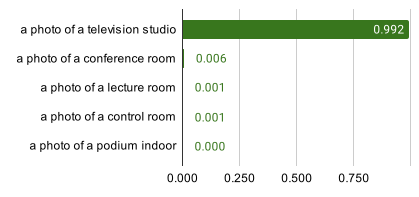
[['a photo of a television studio', 'a photo of a conference room', 'a photo of a lecture room', 'a photo of a control room', 'a photo of a podium indoor'],
[0.9920725226402283, 0.006038925610482693, 0.0009973491542041302, 0.00078492151806131, 0.00010626466246321797]]
可以看到,现在 a photo of a television studio 以 0.992 的 clip_score 分数排在首位。在实践中,可以使用该端点对另一个搜索系统的匹配结果进行重排,以提升跨模态搜索质量。

|
|
通过 CLIP 模型对文本-图像匹配进行排序
在 DALL·E Flow 项目中,CLIP 被调用来对 DALL·E 生成的结果进行排序。它在 clip-client 之上封装了一个 Executor,其中调用了 .arank() —— .rank() 的异步版本:
from clip_client import Client
from jina import Executor, requests, DocumentArray


class ReRank(Executor):
    def __init__(self, clip_server: str, **kwargs):
        super().__init__(**kwargs)
        self._client = Client(server=clip_server)

    @requests(on='/')
    async def rerank(self, docs: DocumentArray, **kwargs):
        return await self._client.arank(docs)
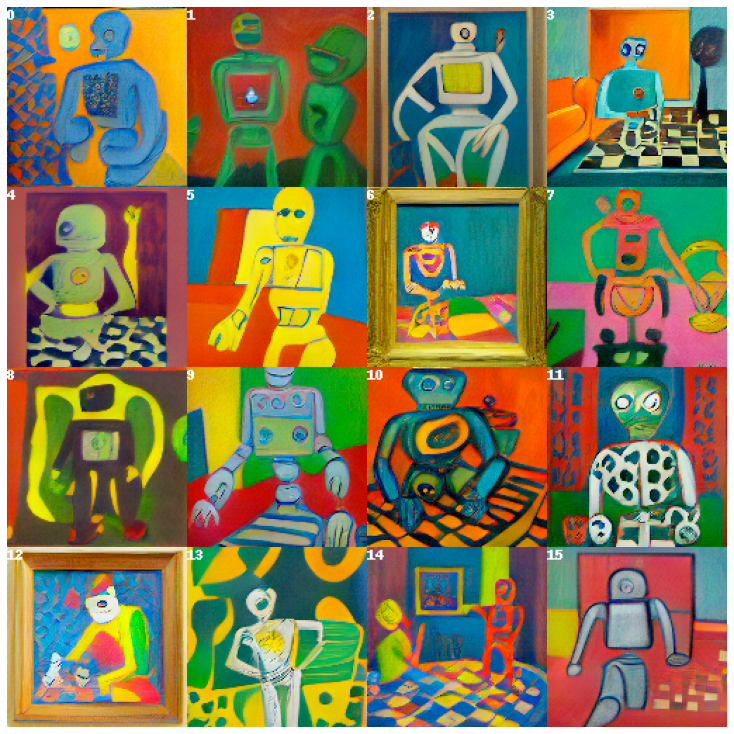
感兴趣了吗?这只是 CLIP-as-service 能力的冰山一角。阅读我们的文档了解更多。
支持
- 加入我们的 Discord 社区,与其他社区成员交流想法。
- 观看我们的 Engineering All Hands,了解 Jina 的新功能,并跟上最新 AI 技术。
- 订阅我们的 YouTube 频道,获取最新视频教程。
加入我们
CLIP-as-service 由 Jina AI 提供支持,并基于 Apache-2.0 许可。我们正在积极招聘 AI 工程师、解决方案工程师,共同构建下一代开源神经搜索生态。